|
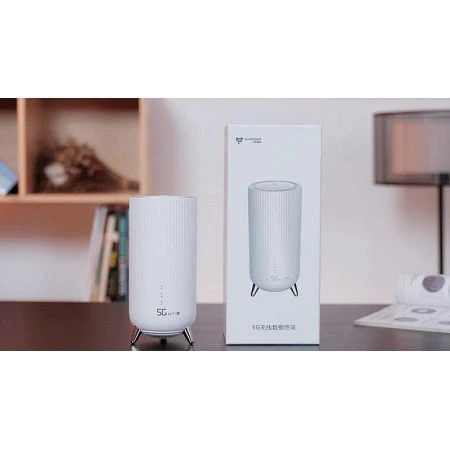
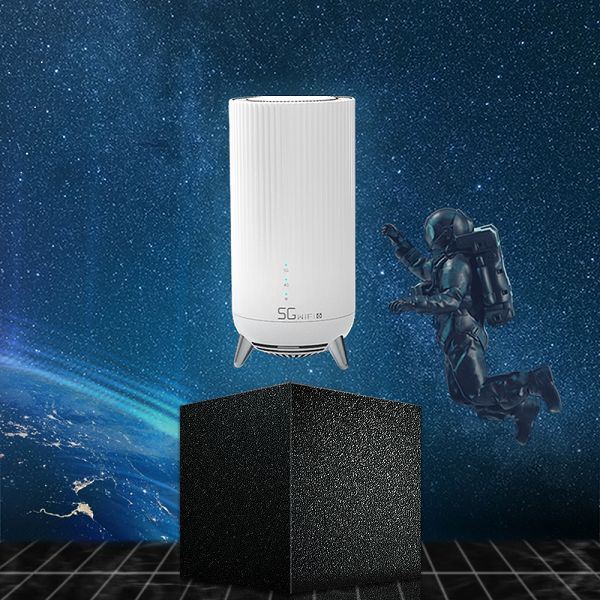
WIFI6 Dual band router The design inspiration of Flymodem 5G CP02 comes from UFO, which represents the yearning and exploration for super experience in outer space. It can be described as a mysterious 5G product. The appearance is modern and simple, and the function distinction is very clear and easy to operate; The fuselage adopts gradient vertical stripe design, symbolizing the speed sense of 5G; The bottom adopts three metal brackets to make the product feel more quality and suspension; The heat dissipation design of up-down convection not only improves the service life of the product, but also makes the signal more stable and speed faster. |
 |
5G WIFI6 Dual band router Specs
|
Product Name |
5G CPE |
Model |
CP02 |
|
|
|
Features |
Main features:11AX protocol、5G CPE、eSim/Mesh TR069 |
||||
|
|
|||||
|
5G WIFI6 Dual band router Hardware specifications: |
Notes |
||||
|
Master control |
5G Chip |
UNISOC: IVY510 |
|
||
|
Wifi Chip |
MT7621A+MT7905DAN(2.4G 5.8G 2T2R)+MT7975DN(FEM) |
|
|||
|
FLASH/ Memory |
1Gbit nand Flash/256MB DDR3 |
|
|||
|
Antenna |
2.4G:2T2R 5.8G: 2T2R 4G:6T6R |
|
|||
|
PCBA |
network port |
10/100/1000Mbps self adaption RJ45*3 8-pin RJ45 port |
|
||
|
USB |
USB2.0*1 |
|
|||
|
Power |
DC 12V/2A |
|
|||
|
Antenna |
2.4G:2T2R 、 5.8G: 2T2R、 DFS 1R、built-in antenna gain 2-3dBm |
|
|||
|
Indicator lights |
POWER indicator light(blue)、WiFi indicator light(blue)、5G networking indictor light(3-color light)、USB indicator light(blue) |
|
|||
|
Network port indicator lights |
Yellow green indicator light |
|
|||
|
Buttons |
1*factory reset(Restart within 3s, and restore factory settings after 3s) |
|
|||
|
Wireless |
Frequency range |
2.4~2.4835GHz、5.150GHz ~ 5.850GHz |
|
||
|
Wireless Speed |
11b:1/2/5.5/11Mbps |
|
|||
|
Working frequency |
2.4G:1~13 |
optional |
|||
|
3G/4G/5G bands |
NR(Rel.15):n1,n28,n41,n78,n79 |
|
|||
|
Spread spectrum technology |
DSSS(Direct sequence spread spectrum) |
|
|||
|
Data modulation mode |
802.11a: OFDM (BPSK,QPSK,16-QAM,64-QAM) |
|
|||
|
Medium access protocol |
CSMA/CA with ACK |
|
|||
|
data encryption |
WPA-PSK/WPA2-PSK、WPA/WPA2 |
|
|||
|
Power (medium power) |
2.4G: 11b: 20dBm ± 1dBm@11Mbps |
|
|||
|
|
|||||
|
TBD |
|||||
|
receiving sensitivity |
2.4G: 11b: <-87dbm@11Mbps; |
|
|||
|
cooling fin |
The whole heat sink covers the main control chip |
|
|||
|
LED lights |
Power(blue) |
Power indicator, blue indicator connected to power is always on |
|
||
|
WiFi(blue) |
Wireless indicator (always on, flashing data transmission): |
|
|||
|
5G(blue green red) |
The 5G network is always on blue, the 4G network is always on green, the 3G/2G network is always on red, and the network failure is flashing red |
|
|||
|
USB(blue) |
Light is always on when USB access, and the light flashes with data flow |
|
|||
|
indicator lights:LAN/WAN |
Green light: the connection status indicator is green and always on. If it is not on, it means that the connection is not successful. |
|
|||
|
indicator lights:LAN |
Green light: the connection status indicator is green and always on. If it is not on, it means that the connection is not successful. |
|
|||
|
Software Specifications |
|
||||
|
Software development |
R&D center |
||||
|
Main functions |
11AX wireless access |
|
|
||
|
Status |
Router status |
|
|
||
|
WiFi users connection status |
|
|
|||
|
5G network status |
|
|
|||
|
Language |
Chinese,English |
|
|
||
|
network |
network setting |
Dynamic IP mode, broadband dialing mode, static IP mode and default dynamic IP |
|
||
|
mobile connection |
Data roaming, search operators, traffic settings |
|
|||
|
Lan |
DHCP setting,default lan IP : 192.168.1.1/24 |
|
|||
|
Wireless |
WiFi setting |
WiFi switch, name, password, protocol, bandwidth, channel, hidden |
|
||
|
Black/white list |
Add (which can be imported from the user list), delete and move the black and white list |
|
|||
|
WPS |
PIN code access,PBC acess |
|
|||
|
Advanced network setting |
IPv6 |
relay mode、static IP、dynamic IP,broadband connection |
|
||
|
APN |
Auto configuration |
|
|||
|
Guest network |
Closed by default |
|
|||
|
Parental control |
Displays the time period when the MAC address of the connecting terminal accesses the external network, and can configure the on switch, device name, MAC address, access time, description, status, etc. |
|
|||
|
VPN client |
PPTP and L2TP |
|
|||
|
SMS |
|
Support |
|
||
|
Firmware |
ALG |
Enable FTP/PPTP penetration /L2TP penetration |
|
||
|
port mapping |
|
|
|||
|
DMZ setting |
|
|
|||
|
MAC Filtering |
|
|
|||
|
IP filtering |
|
|
|||
|
NAT setting |
Complete cone type, symmetrical type, address limiting cone type and port limiting cone type |
|
|||
|
DDOS |
Enable the anti-network attack function. When this function is enabled, the router will start the anti-network attack function. When a host attacks the router, it will automatically limit its bandwidth |
|
|||
|
Management |
SNTP |
|
|
||
|
PIN management |
Fill in the PIN code of the SIM card, and enter the wrong PIN code three times in a row, the SIM card will be locked, and you need to enter PUK to unlock it |
|
|||
|
cell lock |
support. Closed by default. If need open, pls offer server number in advance |
|
|||
|
Traffic statistics |
Traffic statistics are used to visually display the use of broadband resources by intranet PCs |
|
|||
|
TR069 |
In the network management model defined by TR069 protocol, the management server is called Automatic Configuration Server (ACS), which is responsible for the management of CPE. ACS server can restart, reset and upgrade CPE according to TR069 protocol, and can realize the function of managing multiple routers |
Docking Party A's server |
|||
|
Modify password |
|
|
|||
|
Backup , upgrade |
Download the backed-up configuration and upload the backed-up configuration |
|
|||
|
restart ,reset |
support |
|
|||
|
Modem |
For technical personnel operation and maintenance only |
|
|||
|
Voice |
Voice |
English and Chinese supported |
Compatible design |
||
|
Remote manage |
Support remote viewing, login and upgrade management equipment |
||||
|
mesh |
Support |
|
|||
|
Others |
esim |
||||

Hot Tags: 5g wifi6 dual band router, China 5g wifi6 dual band router suppliers, factory, 4G Router with Sim Slot, travel router wisp mode, Built in antenna Router, wifi pocket router, small portable hotspot, WiFI6 Dual Band 5G Router